How I Built Decody: A Real AI App from Flutter to Google Play
Yes—AI can help one person ship a real mobile app, but the useful story starts after the first prototype. I built Decody as a cross-platform pet-moment app, then had to solve media limits, backend security, store review, credits, purchases, failure recovery, and honest product positioning before it became a public iOS and Android product.
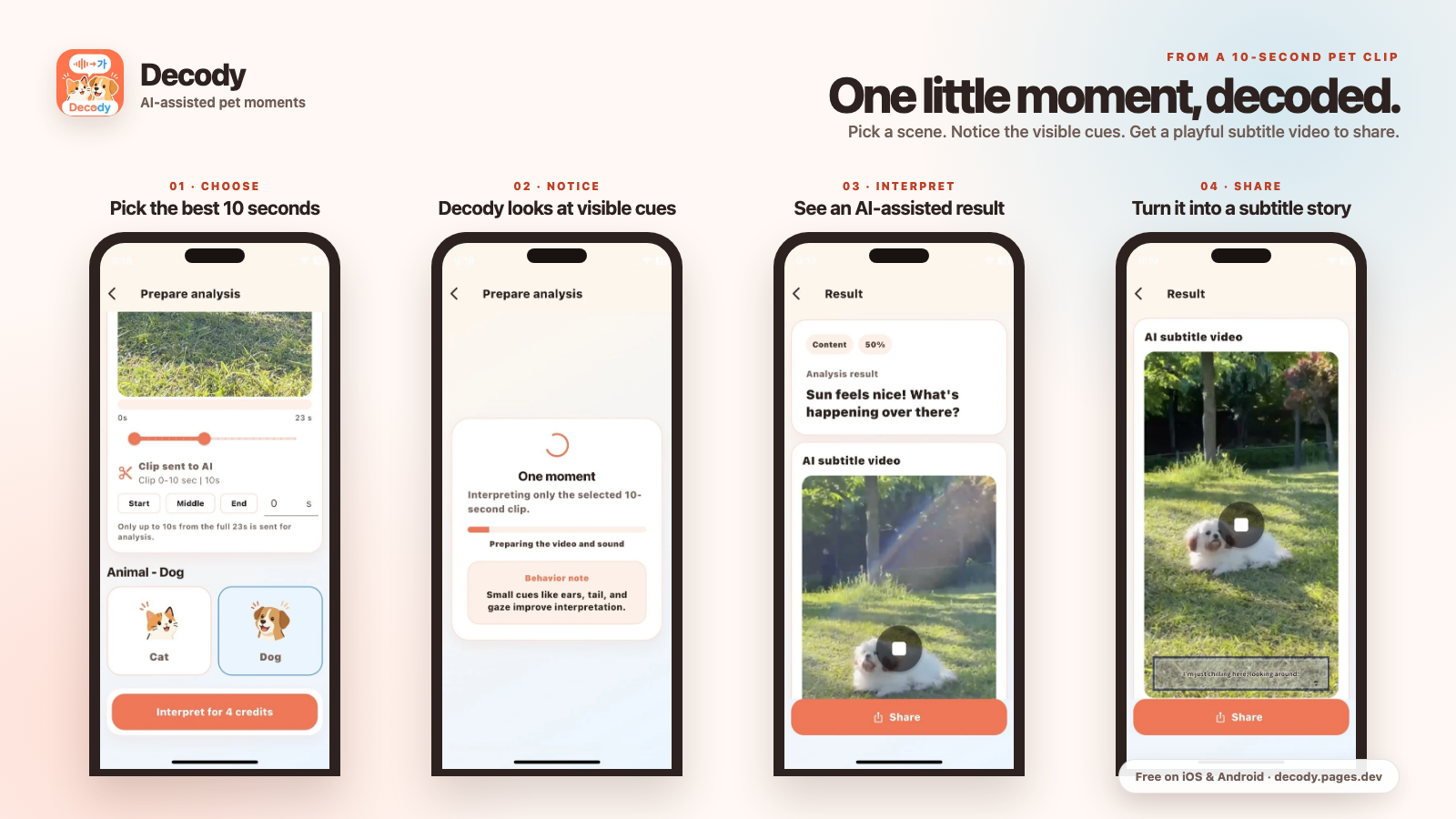
- Product: Decody, a dog-and-cat moment interpretation app.
- Platforms: iPhone, iPad and Android.
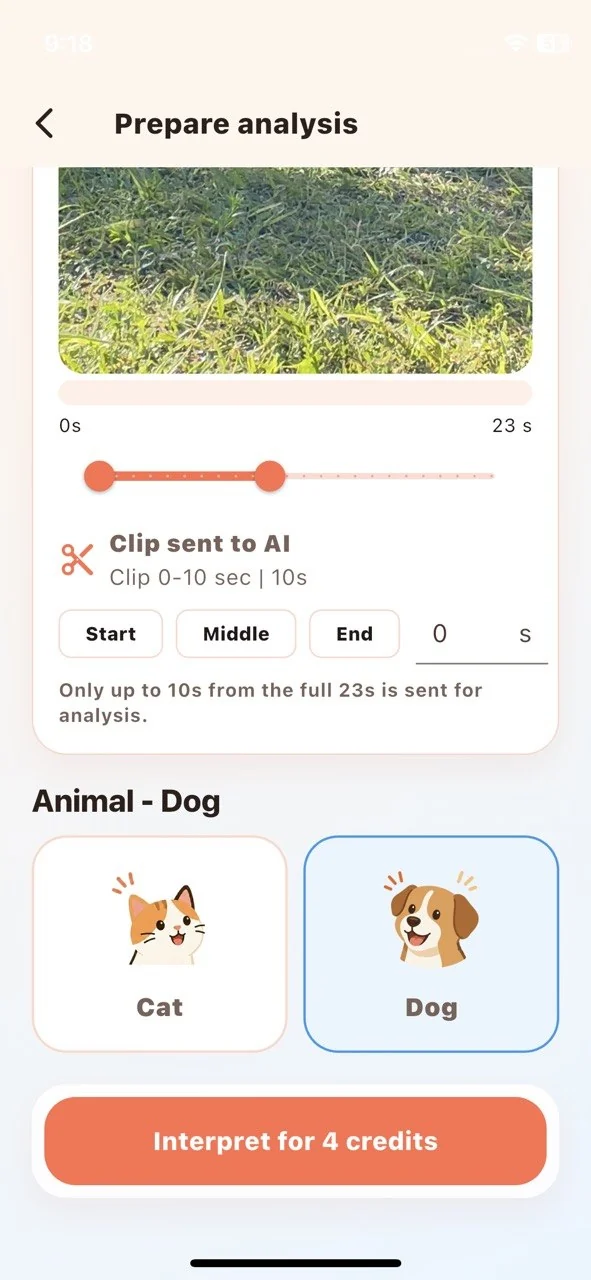
- Core constraint: only the selected 10-second clip is processed.
- Business model: a free entry experience with credits, optional rewarded ads, purchases and recurring value.
- Reality check: a public listing is proof of shipping—not proof of income.
The problem was narrower than “build an AI pet app”
Broad ideas are easy to describe and expensive to operate. “Analyze any pet video” creates immediate problems: large uploads, slow responses, unpredictable AI cost, privacy concerns and vague results. I reduced the promise to one moment the owner already cared about.
The user selects a dog or cat video, chooses the most relevant ten seconds, and receives an interpretation based on visible cues such as posture, expression, movement, ears, tail and scene context. The result can also become a playful subtitle video. Decody does not claim literal animal translation, mind-reading, veterinary diagnosis or professional behavioural advice.

Why the ten-second limit became a product feature
A limit can improve the product when it protects the business and the user at the same time. Processing only a selected ten-second window gave me five advantages:
- Lower and more predictable AI cost. A user cannot accidentally send a long video into an expensive processing path.
- Faster feedback. The app focuses on the moment that caused the question instead of analysing minutes of irrelevant footage.
- Less data exposure. The selected portion is smaller than the full source video.
- Clearer pricing. One analysis has a defined unit of work.
- Better failure handling. Duration, format and upload limits can be validated before an AI request consumes credits.
This is the kind of decision AI coding tools do not make for you. They can implement a clip selector quickly; the developer still has to decide what the system should accept, what it should reject, and who pays when a provider fails.
The real architecture behind the simple screen
The mobile interface is built with Flutter, but the sensitive work does not live inside the app bundle. The release architecture separates responsibilities:
| Layer | What it owns | Why it is separate |
|---|---|---|
| Flutter app | Clip selection, animal choice, status, results and sharing | Keeps the user flow responsive and cross-platform |
| Backend API | Authentication, validation, clipping, rate limits and provider calls | AI keys and server secrets must not ship in the app |
| Credit ledger | Reservation, grant, refund and purchase state | A local number can be edited; a server record can be reconciled |
| Store billing | Purchases, subscription lifecycle and restore | Store receipts need verified, repeat-safe handling |
The backend can route work to configured AI providers, but the app never receives a private provider key. Purchases are reconciled with a server-side ledger. If media processing or an AI request fails after a credit reservation, the failure path must return that credit. Those details are not exciting in a launch video, but they decide whether users trust the product.
What AI accelerated—and what it did not
AI assistance was valuable for scaffolding code, comparing implementation options, drafting tests, organising release checklists and finding repeated edge cases. It was less useful whenever the answer depended on the actual device, store account or product promise.
| AI helped with | I still had to verify |
|---|---|
| Flutter UI iterations and state handling | Touch targets, device layout and real video selection |
| API schemas and failure cases | Provider timeouts, clipping binaries and credit refunds |
| Store-copy drafts and translations | Every screenshot, claim, policy answer and regional listing |
| Test ideas and automation | Real-device behaviour, purchase restore and review readiness |
Monetisation had to match the variable cost
A static calculator can sell one unlock. An AI media app pays a new processing cost whenever a user runs another analysis. That made a credit model more honest than pretending every user creates the same cost.
In the current Decody flow, video analysis consumes credits. The broader design supports a free entry, optional rewarded ads, credit purchases and a recurring plan for users who receive recurring value. The important rule is that monetisation must not break the main task: ads need a clear opt-in and promised reward, purchases need restore and refund handling, and a subscription needs ongoing value rather than a recurring charge attached to a static feature.

The launch result: shipped, but still early
Decody is publicly listed for Android and iOS. That matters because it proves the complete path—product decisions, signed builds, store assets, privacy disclosures and review—was crossed. It does not justify an income claim. A live listing still needs discovery, activation, retention, reviews and a unit-economics loop that survives real usage.
I am the developer of Decody. It is free to download, includes optional in-app purchases, and is intended for curiosity and entertainment—not veterinary diagnosis.
Get Decody on Google Play Download on the App Store See how Decody works
Seven lessons for an Indian solo developer
- Choose one expensive action and bound it. A ten-second window was more valuable than a vague “unlimited AI” promise.
- Keep secrets off the phone. Assume a public app bundle can be inspected.
- Design the refund path before the happy path scales. Users should not pay for a provider failure.
- Use actual app screens in marketing. A beautiful concept image cannot replace product proof.
- Write the safety boundary into the product. Responsible positioning is part of UX, not only a legal footer.
- Match the revenue model to recurring cost. Ads, credits, one-time purchases and subscriptions solve different problems.
- Treat publication as the start of measurement. Installs alone do not reveal activation, retention or contribution margin.
More field notes are on the way
I am publishing the cost, closed-testing and monetization notes one at a time after a final fact check. The next guide is scheduled for 17 August.
Sources and product links
- Decody on Google Play
- Decody on the App Store
- Official Decody website and safety explanation
- Google AdMob rewarded-ad policies
Developer disclosure: I built and publish Decody under Aussie Pus. This article documents the product and may send readers to its store listings. It contains no paid testimonial and makes no income guarantee.
Comments
Post a Comment