Google Play Account Cost in India (2026): Real Launch Budget
The official Google Play developer account cost is a US$25 one-time registration fee. In India, your card provider converts that amount and may add applicable taxes or foreign-exchange charges. The fee is real, but it is rarely the largest cost of launching a useful Android app.

- Play Console registration: US$25 once, according to Google.
- New personal account testing: some accounts must keep at least 12 testers opted into a closed test for 14 continuous days before applying for production access.
- App publishing: there is no separate fee for every free app you upload.
- Digital sales: Google Play service fees may apply to paid apps, subscriptions and in-app digital purchases.
- Real budget: devices, artwork, backend services, AI usage, support and your time determine the total.
What the US$25 fee actually buys
The registration fee creates the developer account that can manage Android apps in Play Console. Google also requires the account holder to accept the Developer Distribution Agreement, choose a personal or organisation account type and complete the applicable identity verification. New personal accounts may need Android-device verification as well.
The US$25 charge does not buy guaranteed approval, installs, rankings or revenue. Every app still needs a compliant store listing, policy declarations, testing and review. If the identity information is invalid, Google says the registration fee may not be refunded.
The real launch budget: required, conditional and optional
| Cost area | Required? | Low-cost approach | When it grows |
|---|---|---|---|
| Play Console account | Yes | US$25 one time | Usually no recurring account charge |
| Android hardware | A real device is practically essential | Use a phone you already own plus emulator coverage | Add low-memory, older-OS and large-screen devices |
| Store artwork | Yes | Capture real screens and design in free tools | Professional localisation, video and experiments |
| Privacy and support pages | Often required by features/policies | Static HTTPS pages on an existing site | Help centre, ticketing and response operations |
| Backend and AI | Only if the app needs them | Free tiers, strict quotas and small test traffic | Compute, storage, observability and provider usage |
| Testing labour | Yes | Founder time and representative volunteer testers | Device lab, QA support and paid testing |
Ponytail rule: do not buy infrastructure for a million users before twelve people can finish the first useful action. Use the phone, static hosting and free tiers you already have, then upgrade the bottleneck proved by real usage.
The hidden cost most first-time developers miss: elapsed time
For personal developer accounts created after 13 November 2023, Google may require a closed test with at least 12 testers continuously opted in for 14 days. Meeting the count does not publish the app automatically. The developer applies for production access and answers questions about the app, testing and feedback. Google says that review usually takes seven days or less, although it can take longer.
That makes “I will launch this weekend” an unsafe plan for a new account. Recruitment, tester drop-off, bug fixes and production-access review belong on the schedule before you announce a release date.
The detailed 14-day closed-testing plan is scheduled for 24 August. Until then, use the official Play Console help linked in the sources below.
Three realistic budget levels
1. The proof-of-demand build
- One narrow feature
- Your existing Android phone
- Emulator checks for additional screen sizes
- Static privacy and support pages
- No paid acquisition
- Hard API quota or no backend at all
This level is for learning whether anyone completes and repeats the main task. It should not carry an “unlimited” promise or a backend bill that can run without a cap.
2. The credible public launch
- Representative closed testers
- Crash reporting and basic product analytics
- Actual store screenshots with accurate alt text
- Support workflow and deletion/contact instructions
- Low-memory and slow-network testing
- A small monthly operations reserve
This is the sensible target for most solo developers. The product is still small, but it can explain errors, protect user data and respond to a bad release.
3. The AI or media app
- Authenticated backend
- Secret management
- Media validation and storage rules
- Per-user and daily rate limits
- AI-provider budget caps and failure fallback
- Purchase reconciliation and refund-safe credits
The registration fee is almost irrelevant at this level. One uncontrolled media or AI path can cost more than the developer account. Meter the expensive action, define what happens when it fails and track contribution margin per completed job.
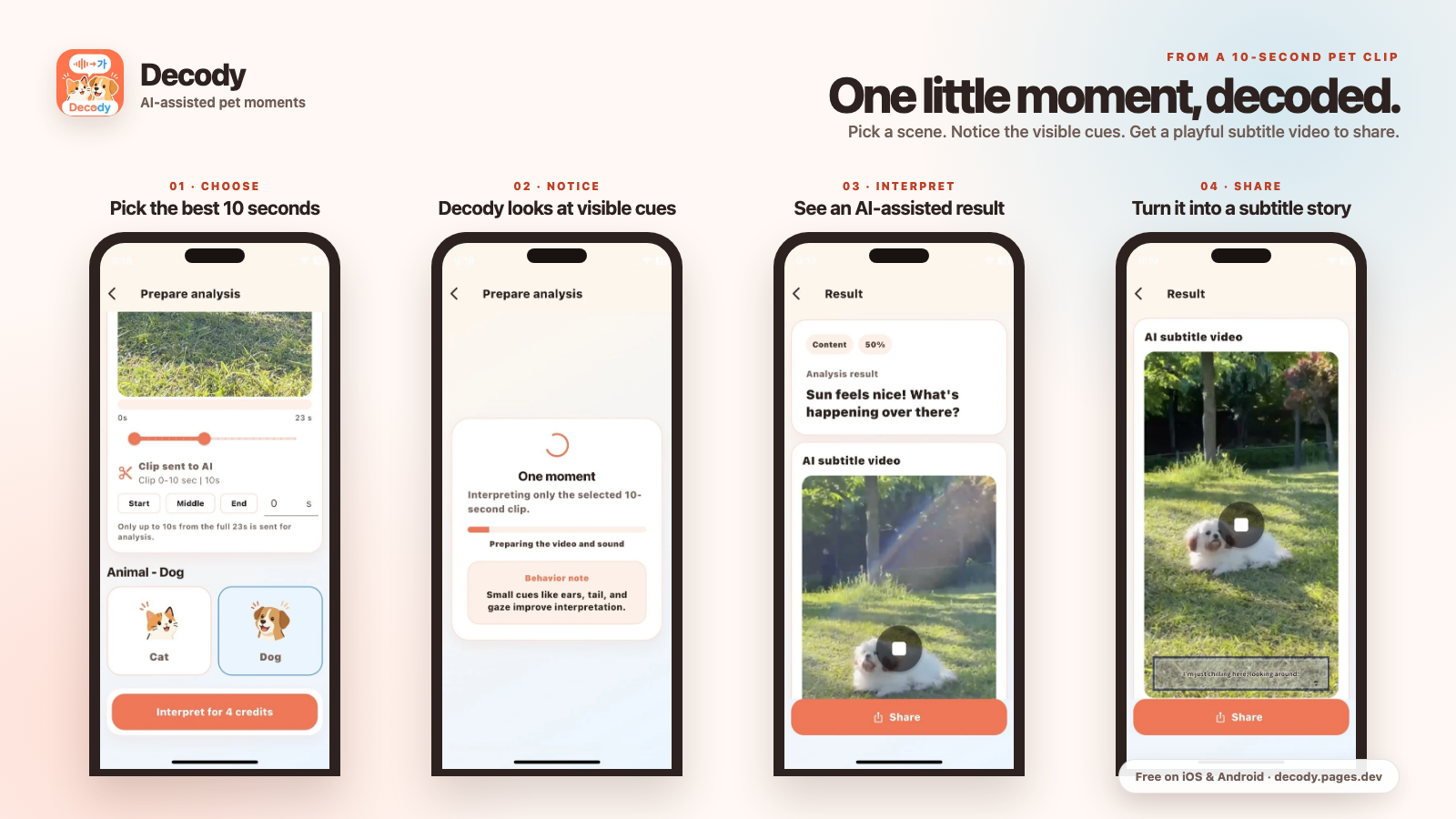
Store assets are part of the budget
Google requires at least two screenshots across device types for a store listing. For broader recommendation surfaces, its current guidance strongly recommends at least four high-resolution app screenshots, while games need at least three qualifying screenshots. The screenshots must represent the current app rather than an imagined redesign.
A feature graphic is 1024×500 pixels. Descriptions have limits too: 30 characters for the app name, 80 for the short description and 4,000 for the full description. These are not expensive if you prepare them yourself, but they take real production and review time.

A launch calculation that is more useful than a fixed number
First-90-day launch budget
registration + hardware gap + creative work + backend/API cap + support reserve + tax/fee buffer
Put a ceiling beside every variable item. If a service cannot enforce a budget alert or hard quota, assume the worst-case bill belongs in the risk column.
Where the money can come back
A developer account is not an investment product; it is access to a distribution system. Revenue still depends on a useful product and a fitting model:
- Ads can fit frequent, broad free usage.
- One-time purchases can unlock a durable feature.
- Consumable credits can map variable processing cost to usage.
- Subscriptions need recurring value, not merely recurring billing.
The monetization comparison is scheduled for 31 August. For the complete product example available now, see how I built and launched Decody.
Decody is my public iOS and Android case study. It processes a selected ten-second pet moment and returns an AI-assisted interpretation. It is for entertainment and reflection, not veterinary advice.
Official sources
- Google Play Console registration and US$25 fee
- Testing requirements for new personal accounts
- Google Play preview asset requirements
- Store listing fields and character limits
Accuracy note: Google can change fees, testing rules and policy requirements. Variable budget items above are planning categories, not price quotations. Verify the official pages and your Play Console before paying or announcing a launch date.


Comments
Post a Comment